Blender 3D – Modelling the RMS Titanic
Course Overview In this course, learners will embark on an exciting journey to model the RMS Titanic from scratch using Blender 3D. This step-by-step video-based course is designed for beginners and intermediate users, guiding them through the entire modelling process—from …
Course Overview
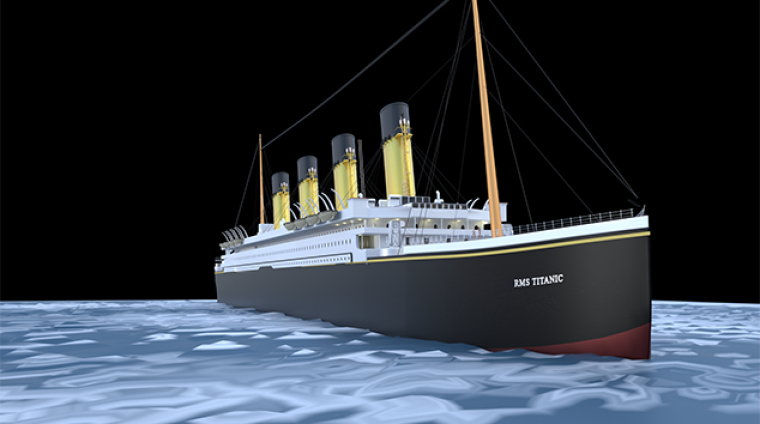
In this course, learners will embark on an exciting journey to model the RMS Titanic from scratch using Blender 3D. This step-by-step video-based course is designed for beginners and intermediate users, guiding them through the entire modelling process—from setting up reference images to texturing and rendering a realistic Titanic model.
By the end of the course, students will have a fully modelled Titanic ship and a strong understanding of essential Blender modelling techniques, texturing, lighting, and rendering workflows.
Who is This Course For?
- Beginners who want to learn 3D modelling in Blender.
- Intermediate users looking to improve their modelling skills with a structured project.
- 3D artists who want to recreate historical ships in Blender.
- Game developers and animators interested in adding high-quality ship models to their projects.
What You Will Learn
- How to navigate Blender’s interface and modelling tools
- Using reference images and blueprints for accurate modelling
- Creating realistic hull, decks, smokestacks, and lifeboats
- Applying materials, UV mapping, and textures for a polished look
- Setting up lighting and rendering cinematic Titanic scenes
Course Structure
- Course Overview
1.1 What you will learn, final deliverable, tools, and file organization
1.2 How to use this course—repurposing existing YouTube clips and integrating new content
1.3 Downloadable assets provided (blueprints, textures, starter files) - Gathering References
2.1 Researching plans, blueprints, and historical photos
2.2 Setting up a reference board in your 3D software
2.3 Verifying scale and proportions - Blocking Out the Hull
3.1 Establishing correct proportions from blueprints
3.2 Creating the basic hull silhouette (spline or box modeling)
3.3 Refining hull curvature with edge loops or control points
3.4 Ensuring waterline accuracy - Deck Structure & Superstructure
4.1 Modeling main decks and bulkheads (extrude and inset techniques)
4.2 Creating promenade decks and railings using arrays or curve modifiers
4.3 Detailing deck planking - Funnels, Masts & Rigging
5.1 Modeling the funnels (tapered cylinders, flanges, grills)
5.2 Building lattice-style masts and cargo booms
5.3 Adding rigging: curve-based ropes for davits and signal wires - Lifeboats & Davits
6.1 Blocking out lifeboat hulls, benches, and oars
6.2 Modeling davits and mechanical pivoting arms
6.3 Integrating lifeboats onto the deck - Detailing & Fine Elements
7.1 Creating portholes and windows (boolean cuts vs. inset/extrude)
7.2 Modeling ventilators, winches, and deck furniture
7.3 UV-unwrapping small props and applying tiling textures - UV Mapping & Materials
8.1 Organizing UV islands by material type (metal, wood, paint)
8.2 Setting up PBR materials in your renderer (Cycles, Arnold, V-Ray)
8.3 Texturing walkthrough: wood planks, painted steel, brass fittings - Lighting, Environment & Water
9.1 HDRI and sunlight setup for realistic shadows
9.2 Creating a shader-based ocean or simple wave simulation
9.3 Adding background elements: dockside or open-sea backdrops - Camera Setup & Animation
10.1 Designing camera paths: fly-around, crane shot, interior walkthrough
10.2 Animating ship motion: bobbing on waves, rotating funnels
10.3 Keyframe tips and camera easing techniques - Rendering & Post-Production
11.1 Optimizing render settings: samples, denoising, tile size
11.2 Compositing in After Effects/DaVinci Resolve: color grading, fog, grain
11.3 Assembling final video: intro/outro, lower thirds, on-screen annotations - Bonus: Troubleshooting & Optimization
12.1 Managing polycount and level of detail
12.2 Fixing mesh artifacts and normals issues
12.3 Speeding up render times and export workflows
Final Project & Certification
- Final Titanic Scene Presentation – Apply what you’ve learned to render a stunning image of the Titanic.
- Students who complete all lessons will receive a Certificate of Completion.
Tools and Software Required
- Blender (Latest Version) – Free and open-source.
- Reference Images & Blueprints (provided in the course).
- Textures & HDRI Lighting Files (included in course materials).
Why Take This Course?
Hands-on learning with a real-world project (Model the Titanic from scratch).
Step-by-step structured lessons with professional techniques.
Practical Blender skills that can be applied to game design, animation, and 3D visualization.
Enroll Today!
Start your journey in Blender 3D modeling and bring history to life by recreating the RMS Titanic. This course provides high-quality video lessons, detailed project guidance, and expert tips for stunning 3D modeling and rendering.
Curriculum
- 5 Sections
- 14 Lessons
- 10 Weeks
- Chapter 1: Course Overview1
- Chapter 2: Gathering References3
- Chapter 3: Blocking Out the Hull4
- Chapter 4: Deck Structure & Superstructure3
- Chapter 5: Funnels, Masts & Rigging3
You might be intersted in
-
0 Students
-
10 Weeks
-
2 Students
-
4 Weeks